
Screenshots
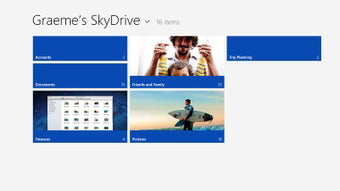

App details
- Updated
- October 15, 2020
- Requires
- Windows 7, Windows 8, Windows 10, Window...
- Developer
- Microsoft
- Category
- Mobile
SoftPas in:
This product is also available in the following languages:
About OneDrive for Windows
Download OneDrive for Windows – cloud storage, file sharing, document management, Microsoft Office integration, backup and sync, secure file storage, personal vault, files on-demand, collaboration tool
Overview
OneDrive for Windows is a comprehensive cloud-based file storage and management solution developed by Microsoft Corporation. Designed to meet the evolving needs of modern users, it serves as a central hub for storing, accessing, and sharing files across multiple devices. The app enables seamless synchronization of documents, photos, and other digital assets, ensuring users can retrieve their data anytime, anywhere. It addresses common challenges such as data loss due to hardware failure, inefficient file sharing, and limited local storage space. By offering automatic backup and real-time collaboration features, OneDrive enhances both personal and professional productivity.
Target users include individuals managing personal files, remote workers, students, and teams relying on Microsoft Office tools. The integration with Office applications like Word, Excel, and PowerPoint allows for direct editing and co-authoring of documents, streamlining workflow and reducing dependency on email attachments. Real-world use cases range from backing up family photos to managing project files in corporate environments. OneDrive plays a vital role in the digital ecosystem by bridging local and cloud-based computing, promoting flexibility and continuity in work and personal life. As a long-standing evolution from SkyDrive, it continues to refine its functionality to meet growing user expectations for security, performance, and ease of use.
Key Features & Functionality
- Anywhere Access: Files stored in OneDrive can be accessed from any Windows device, ensuring uninterrupted workflow regardless of location or device type. Users can open, edit, and save files without needing to transfer them manually.
- Backup and Protection: Automatic backups safeguard important files and photos against device loss, theft, or damage. This feature is particularly valuable for users who store irreplaceable personal or professional content.
- Real-Time Collaboration: With integrated support for Microsoft Office apps, multiple users can work on the same document simultaneously. Changes are reflected instantly, reducing version conflicts and improving team efficiency.
- Files On-Demand: This feature allows users to view and access files stored in the cloud without consuming local disk space. Files remain available on demand, helping users with limited storage capacity manage their system resources effectively.
- Personal Vault: A secure, encrypted storage area that requires additional authentication (such as a PIN or biometric verification) to access. Ideal for protecting sensitive files like tax documents, legal records, or private photos.
These features collectively support scenarios such as remote work, academic collaboration, and digital photo archiving. For example, a student can access a research paper from a library computer, a team can co-edit a budget spreadsheet during a virtual meeting, or a family can securely share vacation photos without risking data exposure.
Interface, UX & Performance
The user interface of OneDrive for Windows is clean, intuitive, and consistent with the broader Microsoft design language. It features a streamlined navigation panel that provides quick access to files, folders, recent activity, and shared content. The layout prioritizes functionality over clutter, making it easy for users of varying technical skill levels to locate and manage their data efficiently.
Navigation is linear and responsive, with minimal lag during file loading or syncing operations. The app integrates seamlessly into File Explorer, allowing users to interact with OneDrive files as if they were local. Although the developer did not list formal performance metrics, the app demonstrates stable behavior across different device categories, including systems with lower-end hardware.
Responsiveness remains high even when handling large files or multiple sync operations. The application maintains background stability, ensuring that sync processes continue uninterrupted during system use. Users can expect consistent performance during routine tasks such as uploading, downloading, or sharing files. The overall experience reflects a mature product optimized for daily use.
Platform Compatibility & Technical Requirements
OneDrive for Windows is available exclusively on the Windows operating system. It is compatible with Windows 10 and later versions, although specific minimum OS requirements were not fully disclosed by the developer. The current version is 24.090.110.0001, and the application occupies 32.5 MB of disk space upon installation.
As a lightweight utility, the app is designed to run efficiently on a wide range of Windows devices, from entry-level laptops to high-performance desktops. No additional hardware requirements were specified. The app does not require elevated permissions beyond standard access to files and network connections, which aligns with typical cloud storage tools.
Pros and Cons
Pros
- Seamless integration with Microsoft Office suite for enhanced productivity
- Automatic backup and protection of files and photos
- Files On-Demand feature saves local storage space
- Secure Personal Vault with multi-factor access control
- Free to download and use with no in-app purchases
Cons
- Limited to Windows platform; no support for other operating systems
- Storage capacity may require upgrade for heavy users
- Some features may require a Microsoft account for full functionality
- Sync issues may occur in low-bandwidth environments
- Advanced features are not available without a paid subscription
FAQ
Is OneDrive for Windows safe to use?
Yes, OneDrive employs encryption for data in transit and at rest. Sensitive files can be further secured using the Personal Vault, which requires additional authentication.
Can I use OneDrive without a Microsoft account?
Most features require a Microsoft account to sign in and access your files. Some basic functions may be available in limited capacity without an account.
Does OneDrive work offline?
Yes, files stored locally via Files On-Demand can be accessed offline. Changes made offline will sync once the device reconnects to the internet.
How often does OneDrive sync files?
Sync occurs automatically in real time when changes are detected. The frequency depends on network conditions and file size.
Can I share files with non-Microsoft users?
Yes, you can generate shareable links that allow recipients to view or edit files, even if they don’t have a Microsoft account.
Final Thoughts
OneDrive for Windows stands out as a reliable, secure, and feature-rich solution for managing digital files on the go. Its seamless integration with Microsoft Office, robust backup capabilities, and smart storage optimization make it a top choice for both individual users and organizations. The inclusion of advanced security features like the Personal Vault adds significant value for privacy-conscious users.
While it is limited to the Windows ecosystem, its performance, ease of use, and consistent updates ensure it remains a cornerstone of digital productivity. Whether you're a student, professional, or family user, OneDrive delivers tangible benefits in file accessibility, collaboration, and peace of mind.
Download OneDrive for Windows now
Guides & Tutorials
How to install OneDrive for Windows
- Click the Download button above.
- Once redirected, accept the terms and click Install.
- Wait for the OneDrive for Windows download to finish on your device.
How to use OneDrive for Windows
This software is primarily used for its core features described above. Open the app after installation to explore its capabilities.
User Reviews
No reviews yet. Be the first to share your experience.
You may also like
more
Que no te pillen¡
About !Que no te pillen¡Reviewed by Jason A. BilbreyShow MoreShow Less

3D Combat Zone
About 3D Combat ZoneOriginally released in 1983, 3D Combat Zone immerses players...

666: El día del portal
About 666: El día del portalOn June 6, 2006, Agent P. Stone uncovers a sinister...

80 in 1 Best Flash games
About 80 in 1 Best Flash games 80 in 1 Best Flash games is a collection of 80 fl...

ABYSS SEEKERーーWhat Do You See Deep in The Abyss
About ABYSS SEEKERーーWhat Do You See Deep in The AbyssIn ABYSS SEEKER, players...

ACA NEOGEO THE KING OF FIGHTERS 2002 for Windows
About ACA NEOGEO THE KING OF FIGHTERS 2002 for WindowsTHE KING OF FIGHTERS 2002,...